
Zoho • 12 MIN READ
Moving from MYOB to Zoho Books: steps, costs and pitfalls
Leaving MYOB is easier than most people expect, as long as you pick the right cut-over date and reconcile properly. Here's the process we follow and where it usually goes wrong.
Practical guides on Zoho CRM, websites and growth for Australian businesses, written by the Vixo team in Forestville, NSW. See related services →
Why businesses are moving
The reasons we hear are pretty consistent. Subscription prices keep creeping up. There's an old company file only one person really understands. Or the business has started using Zoho CRM and wants finance in the same place. Sometimes it's simply that the long-time bookkeeper has retired and the new one prefers something else.
Whatever the reason, the move is a finance project, not an IT project. Treat it that way and it's fairly painless. Treat it as 'just export and import' and you'll be untangling it at BAS time.
Pick the cut-over date first
The cleanest switch is at the start of a BAS period, ideally 1 July. You lodge the final BAS from MYOB, and everything from the first day of the new period happens in Zoho Books. Switching mid-quarter means one BAS is split across two systems, and nobody enjoys that.
Good and bad cut-over dates
Best: 1 July
Close the year in MYOB and bring the closing balances in as your opening balances.
Fine: the start of a quarter
1 October, 1 January or 1 April all give you one clean BAS boundary.
Avoid: mid-quarter or the week before a BAS is due
You'll end up handling GST twice and rushing the reconciliation.
The migration, step by step
What moves, and in what order
1. Chart of accounts
Export it from MYOB and tidy it up. This is your one chance to delete the 40 accounts nobody uses. Import it into Zoho Books and check that your bank accounts came across properly, because you can't enter opening balances without them.
2. GST settings and tax codes
Set up your ABN, cash or accruals basis and reporting period in Zoho Books. Then map MYOB codes such as GST, FRE, N-T and CAP to the matching Zoho Books tax rates.
3. Customers, suppliers and items
Import contacts along with their outstanding balances, and items with opening stock if you track inventory.
4. Opening balances
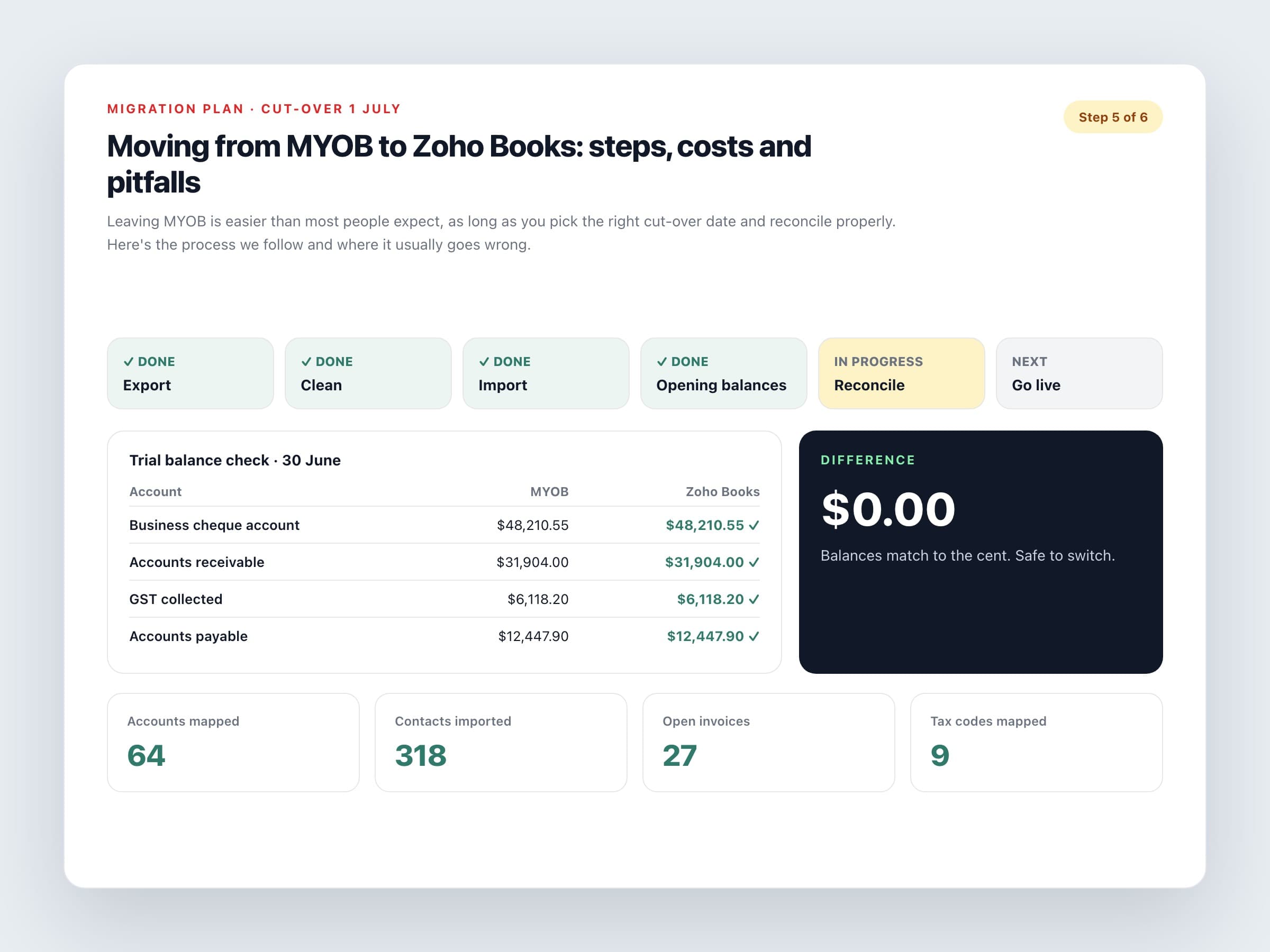
Run a trial balance in MYOB as at your cut-over date and enter it under Opening Balances in Zoho Books, using that same date.
5. Open invoices and bills
Bring unpaid invoices and bills across one by one, so you can receive and make payments against them. A single lump receivables figure makes that impossible.
6. History (optional)
Decide whether you really need years of old transactions in Books. A trial balance plus the open items is often enough.
If the trial balance in Zoho Books doesn't match MYOB to the cent on the cut-over date, you're not finished.
Costs to plan for
The software is the small part. For most small businesses, Zoho Books costs between $16.50 and $44 a month (GST inclusive, billed annually). The bigger costs are your team's time and, if you use one, a migration specialist.
Realistic budget lines
Doing it yourself
This is realistic for a small service business with clean books and simple GST. Allow two to four days of a capable person's time, plus a review from your accountant.
Assisted migration
If you have inventory, several bank accounts or messy history, get help. Ask for a fixed quote that spells out exactly what's included, how much history moves and how the result gets checked.
Payroll
Zoho Books doesn't do Australian payroll, so if MYOB ran your pays you'll need a separate STP-compliant payroll product. Budget for that subscription and its setup.
Keeping access to MYOB records
The ATO generally expects you to keep records for five years. Export your key reports and keep a read-only way to open the old file before you cancel.
The pitfalls we see most
Avoid these and you'll be fine
Leaving payroll until last
Sort out payroll and super before cut-over, including year-to-date figures if you're switching mid-year.
Unreconciled bank accounts
Reconcile everything in MYOB up to the cut-over date first. Migrating unreconciled items just moves the problem somewhere new.
Duplicate contacts
Clean them up before you export. Zoho Books will happily import 'ABC Pty Ltd' and 'ABC P/L' as two separate customers.
No second check
Have your accountant review the first BAS out of Zoho Books before it's lodged.
Done properly, most small businesses are invoicing from Zoho Books within a couple of weeks. The trick is not to rush the boring bits: the cut-over date, the reconciliation, and a trial balance that matches.
